> ## Documentation Index
> Fetch the complete documentation index at: https://docs.useinvent.com/llms.txt
> Use this file to discover all available pages before exploring further.
# Auto Follow-ups
> Let your AI assistant automatically re-engage idle conversations and follow up with customers at the right time
Every abandoned conversation is a missed opportunity. A customer asks about pricing, gets distracted, and never comes back. A lead starts a product inquiry, disappears mid-sentence, and you never hear from them again. With Auto Follow-ups, your AI assistant takes care of this for you, re-engaging customers at just the right moment and turning silent drop-offs into closed deals.
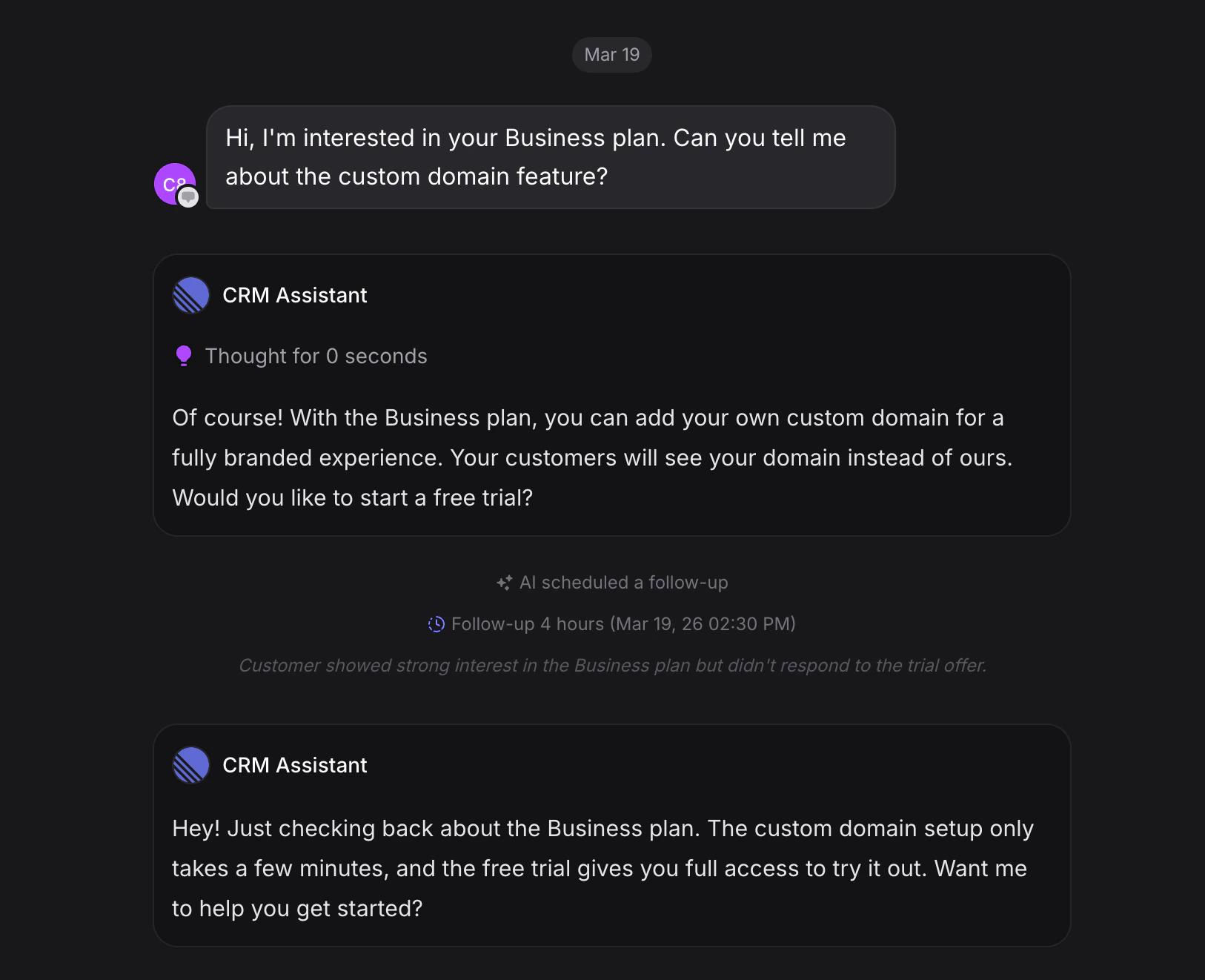 ## What Auto Follow-ups Does
Without Auto Follow-ups, idle conversations are silently closed after a period of inactivity. The customer vanishes, and that's the end of it.
With Auto Follow-ups enabled, your assistant gets smart about idle conversations. Instead of quietly closing them, it:
1. **Analyzes the conversation context** to understand where things left off
2. **Decides whether to re-engage** the customer with a helpful follow-up message
3. **Schedules follow-ups at intelligent intervals**, spacing them out naturally
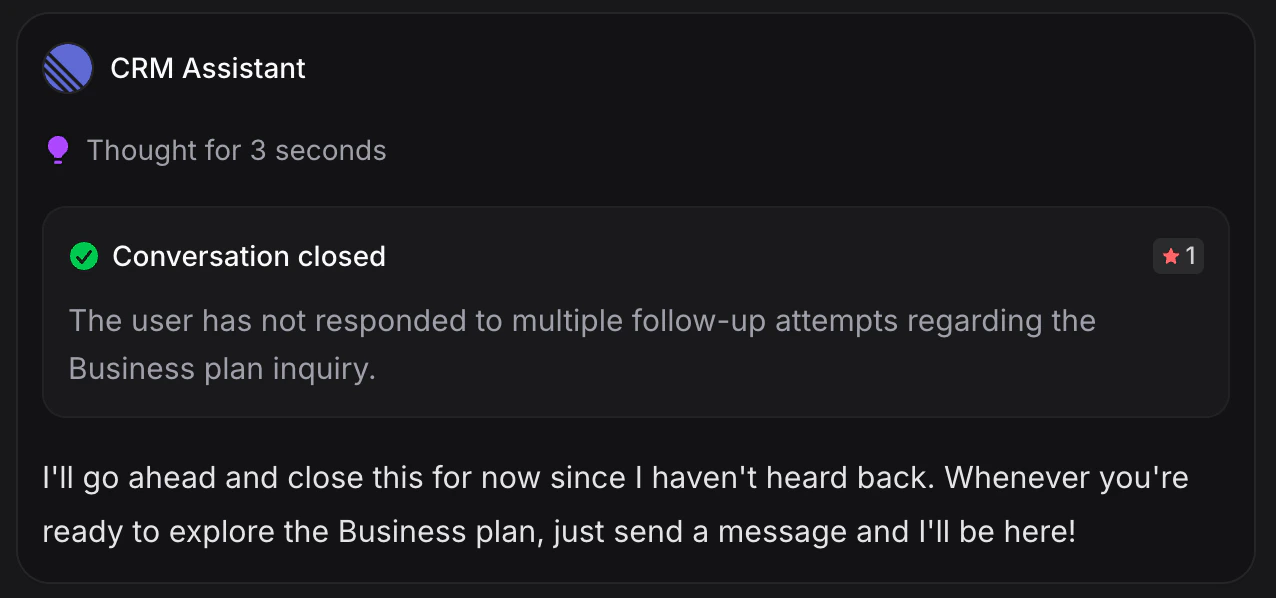
4. **Closes the conversation gracefully** if the customer never responds, complete with a summary and optional CSAT rating
Your assistant doesn't just nudge blindly. It understands *why* the conversation went idle and crafts a follow-up that makes sense. For example, if a customer asked about a product but never provided their size, the assistant will follow up specifically about that.
Auto Follow-ups is one of the most impactful capabilities you can enable. Businesses that follow up with idle conversations recover significantly more leads than those that let them slip away.
## How to Enable Auto Follow-ups
Navigate to the assistant you want to configure and click **Settings**.
Scroll down to the **Capabilities** section. You'll see a list of toggles for features like Auto-resolve, Auto CSAT, Memories, Spam Protection, and Transfer to Human.
Toggle on **Auto Follow-ups**. You'll notice it's tagged as **Recommended** because of how effective it is at recovering conversations.
## What Auto Follow-ups Does
Without Auto Follow-ups, idle conversations are silently closed after a period of inactivity. The customer vanishes, and that's the end of it.
With Auto Follow-ups enabled, your assistant gets smart about idle conversations. Instead of quietly closing them, it:
1. **Analyzes the conversation context** to understand where things left off
2. **Decides whether to re-engage** the customer with a helpful follow-up message
3. **Schedules follow-ups at intelligent intervals**, spacing them out naturally
4. **Closes the conversation gracefully** if the customer never responds, complete with a summary and optional CSAT rating
Your assistant doesn't just nudge blindly. It understands *why* the conversation went idle and crafts a follow-up that makes sense. For example, if a customer asked about a product but never provided their size, the assistant will follow up specifically about that.
Auto Follow-ups is one of the most impactful capabilities you can enable. Businesses that follow up with idle conversations recover significantly more leads than those that let them slip away.
## How to Enable Auto Follow-ups
Navigate to the assistant you want to configure and click **Settings**.
Scroll down to the **Capabilities** section. You'll see a list of toggles for features like Auto-resolve, Auto CSAT, Memories, Spam Protection, and Transfer to Human.
Toggle on **Auto Follow-ups**. You'll notice it's tagged as **Recommended** because of how effective it is at recovering conversations.
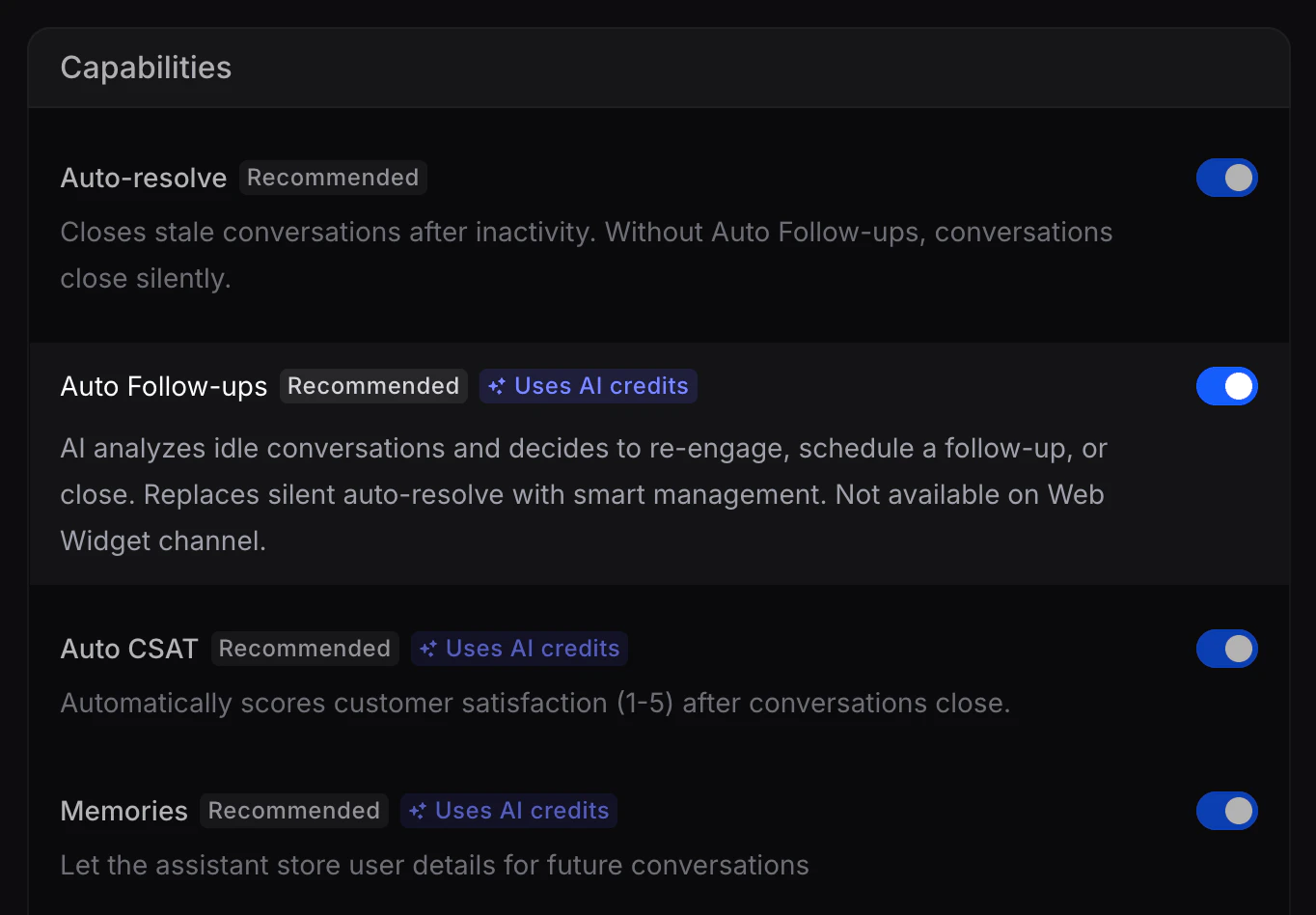 Auto Follow-ups uses AI credits each time your assistant analyzes an idle conversation or sends a follow-up message. The cost is minimal compared to the value of recovering a lost lead.
## How It Works in Practice
### AI-Initiated Follow-ups
Here's what happens when a conversation goes idle:
**1. The customer stops responding**
Your assistant detects the inactivity and analyzes the conversation to understand the current state.
**2. The assistant decides what to do**
Based on the context, it picks one of three actions:
* **Re-engage**: Send a follow-up message to bring the customer back
* **Schedule a follow-up**: Wait and check in later at a better time
* **Close the conversation**: If the topic is resolved or follow-ups have been exhausted
**3. Follow-ups are scheduled intelligently**
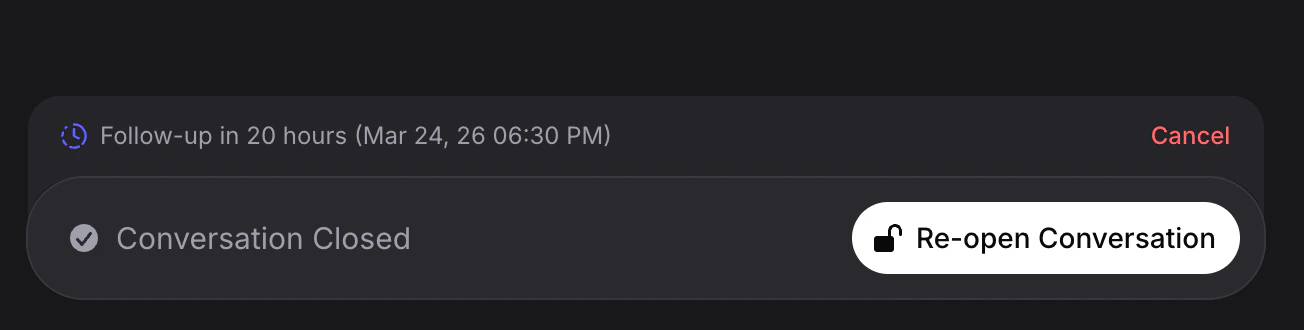
The assistant picks intervals that feel natural. You might see something like "Follow-up in 23 hours" rather than an immediate ping. Each follow-up includes a reason, so you always know what the assistant is thinking.
Auto Follow-ups uses AI credits each time your assistant analyzes an idle conversation or sends a follow-up message. The cost is minimal compared to the value of recovering a lost lead.
## How It Works in Practice
### AI-Initiated Follow-ups
Here's what happens when a conversation goes idle:
**1. The customer stops responding**
Your assistant detects the inactivity and analyzes the conversation to understand the current state.
**2. The assistant decides what to do**
Based on the context, it picks one of three actions:
* **Re-engage**: Send a follow-up message to bring the customer back
* **Schedule a follow-up**: Wait and check in later at a better time
* **Close the conversation**: If the topic is resolved or follow-ups have been exhausted
**3. Follow-ups are scheduled intelligently**
The assistant picks intervals that feel natural. You might see something like "Follow-up in 23 hours" rather than an immediate ping. Each follow-up includes a reason, so you always know what the assistant is thinking.
 **4. If the customer never responds**
After multiple unanswered follow-ups, the assistant will gracefully close the conversation. It generates a summary of what was discussed and can prompt the customer with a CSAT rating so you still get feedback.
**4. If the customer never responds**
After multiple unanswered follow-ups, the assistant will gracefully close the conversation. It generates a summary of what was discussed and can prompt the customer with a CSAT rating so you still get feedback.
 ### Customer-Requested Follow-ups
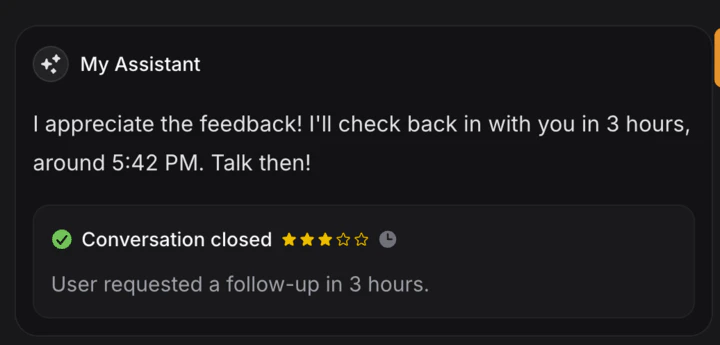
Your customers can also ask for follow-ups directly. If someone says "Can you check in with me tomorrow?" or "Talk to me in 24 hours," the assistant understands the request and schedules accordingly.
> Customer: "I need to think about this. Can you talk to me in 24 hours?"
> Assistant: "Of course! I'll check back in with you tomorrow. Take your time."
The assistant then schedules the follow-up for 24 hours later and re-engages the customer right on time.
### Customer-Requested Follow-ups
Your customers can also ask for follow-ups directly. If someone says "Can you check in with me tomorrow?" or "Talk to me in 24 hours," the assistant understands the request and schedules accordingly.
> Customer: "I need to think about this. Can you talk to me in 24 hours?"
> Assistant: "Of course! I'll check back in with you tomorrow. Take your time."
The assistant then schedules the follow-up for 24 hours later and re-engages the customer right on time.
 ## What You'll See in the Inbox
When Auto Follow-ups is active, your [Inbox](/guides/inbox) gives you full visibility into scheduled follow-ups:
* **Scheduled follow-ups** appear in the conversation with the planned time (e.g., "Follow-up in 23 hours")
* **A Cancel button** lets you stop any scheduled follow-up if you want to handle it yourself
* **The contact panel** on the right shows "Follow-up scheduled in X hours" for quick reference
* **AI reasoning** is visible for each follow-up, so you can see exactly why the assistant decided to re-engage
This means you're never in the dark. You can let the AI handle things automatically, or step in and take over whenever you want.
## Example Scenarios
### Scenario 1: Abandoned Product Inquiry
A customer asks about your premium plan, then goes silent.
* **Without Auto Follow-ups**: The conversation closes silently after the inactivity timeout. The lead is gone.
* **With Auto Follow-ups**: The assistant waits a reasonable interval, then sends a message like "Hi! You were asking about our premium plan earlier. Would you like me to walk you through the pricing?" If the customer responds, the conversation picks right back up.
### Scenario 2: Missing Information
A customer starts a booking request but never provides their preferred time.
* The assistant's reasoning: *"The user started a booking request but hasn't provided their preferred time."*
* It follows up: "Hey! I'd love to finish getting your appointment set up. What time works best for you?"
### Scenario 3: Multi-day Follow-up Sequence
A customer asks a question, then disappears for a full day.
1. After a few hours, the assistant schedules a follow-up for the next morning
2. The next day, it sends a friendly check-in
3. If there's still no response, it schedules one more follow-up
4. After that final attempt, it closes the conversation with a summary and CSAT prompt
The assistant provides reasoning at each step, such as *"User has not responded to the morning follow-up. Scheduling next check-in."*
## Auto Follow-ups vs. Auto-resolve
These two features are related but work very differently:
| | Auto-resolve | Auto Follow-ups |
| ---------------------------------------------- | ---------------------------- | ------------------------------------------------- |
| **What happens when a conversation goes idle** | Silently closed | AI analyzes and decides whether to follow up |
| **Customer experience** | Conversation just disappears | Customer gets a helpful nudge or a graceful close |
| **Lead recovery** | None | High, the AI actively tries to re-engage |
| **Conversation close** | Abrupt | Includes summary and optional CSAT rating |
When Auto Follow-ups is enabled, it takes over the idle conversation handling that Auto-resolve normally does. Think of it as a smarter replacement.
## Inactivity Timers
Understanding when conversations are considered idle:
* **AI-handled conversations** auto-close after **20 minutes** of inactivity (when Auto Follow-ups is disabled)
* **Human-handled conversations** auto-close after **20 minutes** of inactivity
When Auto Follow-ups is enabled, the AI intercepts the closure process and decides whether to follow up instead of closing immediately.
Auto Follow-ups is not available on the Web Widget channel. It works on WhatsApp, Instagram, Messenger, and other supported messaging channels.
## Customizing Follow-up Behavior
Auto Follow-ups works great out of the box, but you can shape how your assistant handles follow-ups by adding specific rules to your assistant's [Instructions](/assistants/introduction#instructions). The AI reads your instructions when deciding whether to follow up, what to say, and when to close.
Add a section like this to your instructions:
```
## Follow Ups
- After 2 tries with no response, schedule the next follow-up for the nearest morning (9 AM) or evening (6 PM), whichever comes first.
- On the final follow-up, offer a 10% discount code to re-engage the customer.
- Never follow up more than 3 times total.
- Keep follow-up messages short and friendly, no more than 2 sentences.
```
Here are some other ideas you can customize through instructions:
* **Timing rules**: "Space follow-ups at least 12 hours apart" or "Only follow up during business hours (9 AM to 6 PM)"
* **Tone adjustments**: "Use a casual, friendly tone for follow-ups" or "Keep follow-ups professional and brief"
* **Escalation paths**: "If the customer mentioned a complaint, transfer to a human instead of following up"
* **Incentives**: "On the second follow-up, mention our free trial" or "Offer free shipping if the customer abandoned a purchase"
* **Limits**: "Never send more than 2 follow-ups" or "Close immediately if the customer said goodbye"
Your instructions give you full control over follow-up strategy without touching any code. Experiment with different approaches and monitor the results in your [Inbox](/guides/inbox).
## Best Practices
1. **Enable it alongside [Memory](/guides/memory)** so your follow-ups reference what the assistant already knows about the customer. A personalized follow-up is far more effective than a generic one.
2. **Trust the AI's timing.** The assistant picks follow-up intervals based on conversation context. Resist the urge to manually override unless you have a specific reason.
3. **Monitor the first few days.** Check your Inbox to see how the assistant is handling follow-ups. Review the reasoning it provides to make sure it aligns with your brand.
4. **Let it close conversations gracefully.** If a customer truly isn't coming back, a clean close with a CSAT prompt is better than an open conversation sitting in your queue forever.
5. **Combine with Auto CSAT.** When the assistant closes a conversation after follow-ups, the CSAT prompt gives you data on customer satisfaction even for conversations that didn't fully convert.
6. **Don't worry about AI credits.** The cost of a few follow-up analyses is trivial compared to the revenue from a recovered lead.
## What You'll See in the Inbox
When Auto Follow-ups is active, your [Inbox](/guides/inbox) gives you full visibility into scheduled follow-ups:
* **Scheduled follow-ups** appear in the conversation with the planned time (e.g., "Follow-up in 23 hours")
* **A Cancel button** lets you stop any scheduled follow-up if you want to handle it yourself
* **The contact panel** on the right shows "Follow-up scheduled in X hours" for quick reference
* **AI reasoning** is visible for each follow-up, so you can see exactly why the assistant decided to re-engage
This means you're never in the dark. You can let the AI handle things automatically, or step in and take over whenever you want.
## Example Scenarios
### Scenario 1: Abandoned Product Inquiry
A customer asks about your premium plan, then goes silent.
* **Without Auto Follow-ups**: The conversation closes silently after the inactivity timeout. The lead is gone.
* **With Auto Follow-ups**: The assistant waits a reasonable interval, then sends a message like "Hi! You were asking about our premium plan earlier. Would you like me to walk you through the pricing?" If the customer responds, the conversation picks right back up.
### Scenario 2: Missing Information
A customer starts a booking request but never provides their preferred time.
* The assistant's reasoning: *"The user started a booking request but hasn't provided their preferred time."*
* It follows up: "Hey! I'd love to finish getting your appointment set up. What time works best for you?"
### Scenario 3: Multi-day Follow-up Sequence
A customer asks a question, then disappears for a full day.
1. After a few hours, the assistant schedules a follow-up for the next morning
2. The next day, it sends a friendly check-in
3. If there's still no response, it schedules one more follow-up
4. After that final attempt, it closes the conversation with a summary and CSAT prompt
The assistant provides reasoning at each step, such as *"User has not responded to the morning follow-up. Scheduling next check-in."*
## Auto Follow-ups vs. Auto-resolve
These two features are related but work very differently:
| | Auto-resolve | Auto Follow-ups |
| ---------------------------------------------- | ---------------------------- | ------------------------------------------------- |
| **What happens when a conversation goes idle** | Silently closed | AI analyzes and decides whether to follow up |
| **Customer experience** | Conversation just disappears | Customer gets a helpful nudge or a graceful close |
| **Lead recovery** | None | High, the AI actively tries to re-engage |
| **Conversation close** | Abrupt | Includes summary and optional CSAT rating |
When Auto Follow-ups is enabled, it takes over the idle conversation handling that Auto-resolve normally does. Think of it as a smarter replacement.
## Inactivity Timers
Understanding when conversations are considered idle:
* **AI-handled conversations** auto-close after **20 minutes** of inactivity (when Auto Follow-ups is disabled)
* **Human-handled conversations** auto-close after **20 minutes** of inactivity
When Auto Follow-ups is enabled, the AI intercepts the closure process and decides whether to follow up instead of closing immediately.
Auto Follow-ups is not available on the Web Widget channel. It works on WhatsApp, Instagram, Messenger, and other supported messaging channels.
## Customizing Follow-up Behavior
Auto Follow-ups works great out of the box, but you can shape how your assistant handles follow-ups by adding specific rules to your assistant's [Instructions](/assistants/introduction#instructions). The AI reads your instructions when deciding whether to follow up, what to say, and when to close.
Add a section like this to your instructions:
```
## Follow Ups
- After 2 tries with no response, schedule the next follow-up for the nearest morning (9 AM) or evening (6 PM), whichever comes first.
- On the final follow-up, offer a 10% discount code to re-engage the customer.
- Never follow up more than 3 times total.
- Keep follow-up messages short and friendly, no more than 2 sentences.
```
Here are some other ideas you can customize through instructions:
* **Timing rules**: "Space follow-ups at least 12 hours apart" or "Only follow up during business hours (9 AM to 6 PM)"
* **Tone adjustments**: "Use a casual, friendly tone for follow-ups" or "Keep follow-ups professional and brief"
* **Escalation paths**: "If the customer mentioned a complaint, transfer to a human instead of following up"
* **Incentives**: "On the second follow-up, mention our free trial" or "Offer free shipping if the customer abandoned a purchase"
* **Limits**: "Never send more than 2 follow-ups" or "Close immediately if the customer said goodbye"
Your instructions give you full control over follow-up strategy without touching any code. Experiment with different approaches and monitor the results in your [Inbox](/guides/inbox).
## Best Practices
1. **Enable it alongside [Memory](/guides/memory)** so your follow-ups reference what the assistant already knows about the customer. A personalized follow-up is far more effective than a generic one.
2. **Trust the AI's timing.** The assistant picks follow-up intervals based on conversation context. Resist the urge to manually override unless you have a specific reason.
3. **Monitor the first few days.** Check your Inbox to see how the assistant is handling follow-ups. Review the reasoning it provides to make sure it aligns with your brand.
4. **Let it close conversations gracefully.** If a customer truly isn't coming back, a clean close with a CSAT prompt is better than an open conversation sitting in your queue forever.
5. **Combine with Auto CSAT.** When the assistant closes a conversation after follow-ups, the CSAT prompt gives you data on customer satisfaction even for conversations that didn't fully convert.
6. **Don't worry about AI credits.** The cost of a few follow-up analyses is trivial compared to the revenue from a recovered lead.