> ## Documentation Index
> Fetch the complete documentation index at: https://docs.useinvent.com/llms.txt
> Use this file to discover all available pages before exploring further.
# Plans & Pricing
> How much you'll pay, what's included in each plan, and how Invent's usage-based pricing works
Most questions about Invent pricing come down to two things:
1. **If my assistant handles X messages a day, how much will that cost me?**
2. **What do I get for the \$29/month plan?**
This page answers both, then explains how the pricing model works underneath.
## How Much Will It Cost Me?
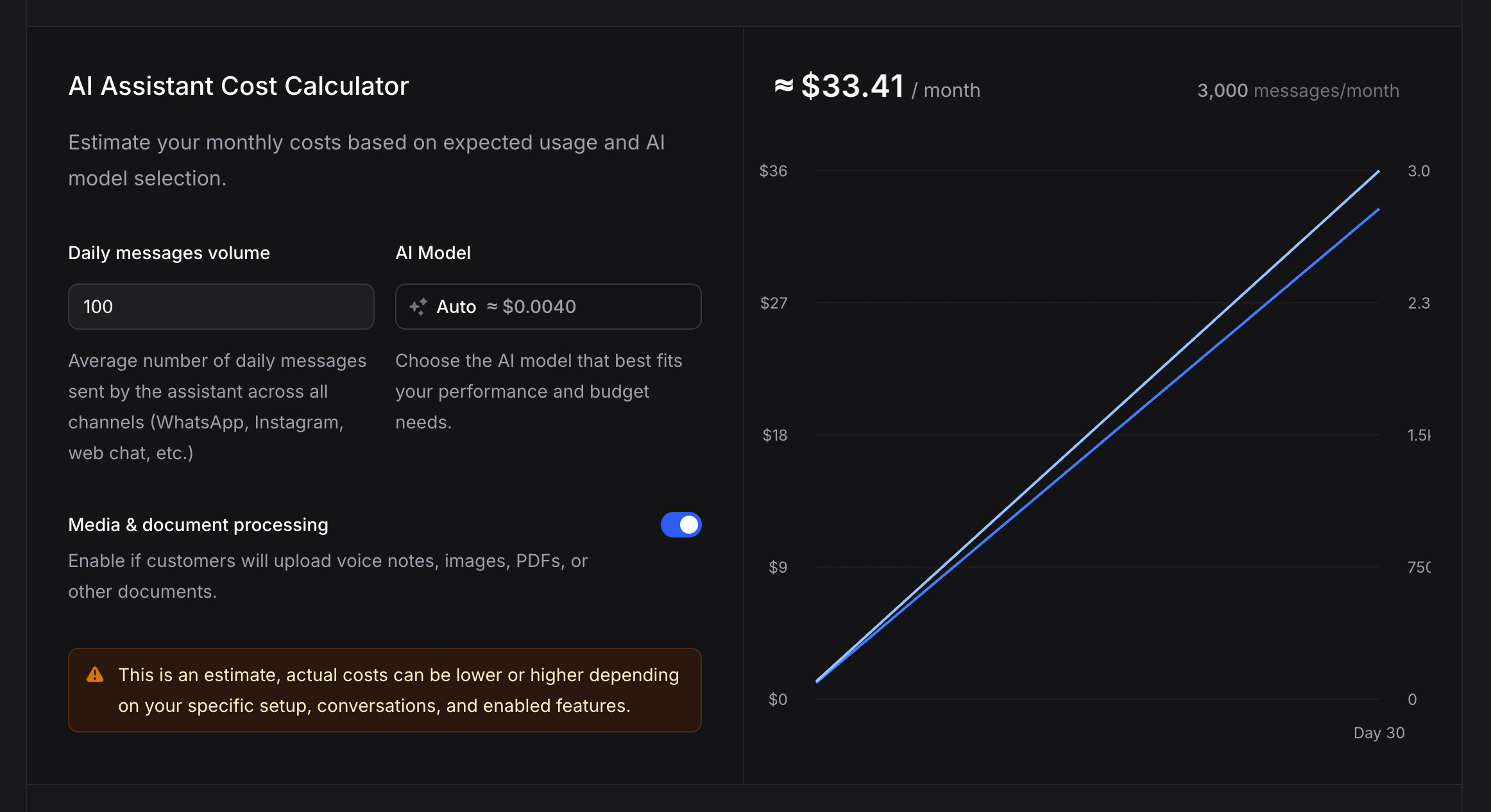
The fastest way to get a real number for your business is the **AI Assistant Cost Calculator** on our pricing page. Enter your daily message volume, pick a model, and your monthly spend updates live on the graph.
Estimate your monthly cost in seconds. Adjust daily messages, pick a model, toggle media processing, and see your monthly total update instantly.
 ### What to Expect at Each Volume
On the **Auto** model (the recommended default that picks a model per message), here is what a typical business pays each month. Most setups land close to these numbers:
| Daily messages | Monthly messages | Monthly cost (Auto) |
| -------------- | ---------------- | ------------------- |
| 50 | \~1,500 | **\~\$15–20** |
| 100 | \~3,000 | **\~\$30–35** |
| 250 | \~7,500 | **\~\$75–90** |
| 500 | \~15,000 | **\~\$150–180** |
| 1,000 | \~30,000 | **\~\$300–360** |
For a live number tied to today's rates and your exact configuration, use the [calculator](https://useinvent.com/pricing#calculator).
### What Changes the Cost
Two assistants at the same volume can land in different places. The main factors:
* **Model choice.** Lighter models (Nano tiers, smaller Gemini/GPT variants) can be up to 10× cheaper per message than premium reasoning models. Auto balances quality and cost and is the right default for most businesses.
* **Media & document processing.** Voice notes, images, and PDFs take more tokens to understand. If your customers send rich media, turn the toggle on in the calculator.
* **Conversation length.** Longer back-and-forth uses more tokens per message. Prompt caching softens this significantly after the first message.
* **Knowledge & actions.** Each Knowledge Base search and each action run adds a small amount on top of the message. For most businesses this is a few cents a day.
## What Do I Get for \$29/Month?
The **Business plan** is \$29/month. Here is what that actually includes:
* **\$29 of usage included each month.** Spent the same way as Pay As You Go usage, at the same per-message rates. Roughly \$29 worth of messages, knowledge searches, and broadcasts before any extra billing kicks in.
* **Premium features unlocked.** Custom domain, white-label branding ("Remove Powered by"), audit logs, sub-organizations, Slack support, larger knowledge storage, and more.
* **Usage above \$29 is billed at the same rate as Pay As You Go.** You are never charged a premium for going over, you just pay for what you use.
If your monthly usage is around \$29 or less and you want the Business-only features (custom domain, whitelabel, audit logs, sub-orgs), the Business plan pays for itself. If you expect to spend more, you still want Business for the feature set, but understand that the \$29 is your baseline, not a cap.
Full feature matrix, limits, and a free trial on the pricing page
### The Three Plans at a Glance
| Plan | Price | Best for |
| ----------------- | ---------- | ------------------------------------------------------------------------------------------------------------------------------------------------- |
| **Pay As You Go** | Free | Trying Invent, small volumes, personal projects. Includes 100 free messages/month and all core features |
| **Business** | \$29/month | Businesses and agencies that want custom domains, whitelabel, audit logs, sub-orgs, and a baseline of included usage |
| **Enterprise** | Custom | Large organizations needing a 99.9% uptime SLA, 24/7 priority support, a dedicated account manager, monthly invoicing, and volume-based discounts |
Every plan uses the same per-message, per-search, per-broadcast rates. The only thing that changes is what's **included** and which features are **unlocked**.
## Knowledge & Broadcasts: Pocket-Change Costs
Both are billed from the same balance as messages. They rarely move the needle compared to the message cost.
### Knowledge
* **Upload**: about **\$0.0005 per chunk** (a chunk is \~350–400 words, about half a page). A 10-page document runs around **\$0.007** to index. A full 100-page help center is around **\$0.07**. One-time charge.
* **Search**: about **\$0.0005 per search**. Identical searches are cached free for 2 hours across your whole organization, so repeat questions don't re-charge.
A business handling **1,000 customer questions a month** typically spends around **\$0.50 on knowledge searches** on top of message costs.
### Broadcasts
Send campaigns via Email, SMS, or WhatsApp. You bring your own provider (Twilio, Meta, SendGrid, etc.) and Invent charges a small per-message fee on top.
| Channel | Invent fee |
| -------- | ------------------- |
| Email | \~\$0.001 / message |
| SMS | \~\$0.001 / message |
| WhatsApp | \~\$0.004 / message |
Your provider bills their own delivery cost separately (Meta template fees, Twilio SMS, etc.).
## How Message Pricing Works
This section is the "why" behind the numbers above. Skip it if the calculator and the cost ranges already answered your question.
### Per-Message Pricing, Not Subscriptions
Invent is usage-based. You pay for what you use, measured per message. Every model in the assistant settings shows its estimated cost per message right next to its name (for example, `Auto ≈ $0.004`). That figure already assumes an average conversation with prompt caching enabled.
Consecutive messages in the same conversation are usually **cheaper** than the per-message figure thanks to prompt caching. The first message tends to cost a bit more since there is no cache yet.
### What Affects a Single Message's Cost
* **The model.** Premium models cost more per message than lighter ones. The calculator shows each model's per-message rate.
* **Response length.** Longer, more detailed replies use more output tokens.
* **Instruction length.** Every message carries your full instructions as context, so bloated instructions compound. Keep them focused. See [Instructions vs Knowledge](/guides/practical/instructions-vs-knowledge) for what belongs where.
* **Actions triggered.** Messages that include a Knowledge Base Search or a tool call use extra tokens. Invent has optimized this significantly (see below).
### Prompt Caching
Enabled on every supported model. When your assistant handles multiple messages in the same conversation, cached context is reused instead of reprocessed. This means:
* **First message**: slightly more expensive, the full context is processed fresh.
* **Consecutive messages**: cheaper than the per-message figure, cached context is read at a reduced rate.
Caches live for up to one hour with the AI provider. A conversation that goes idle longer may rebuild its cache on the next message.
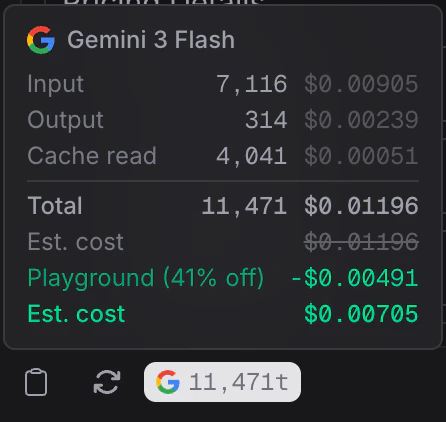
In the Playground, each message shows a token breakdown with a "Cache read" line so you can see exactly how much caching is saving you.
### What to Expect at Each Volume
On the **Auto** model (the recommended default that picks a model per message), here is what a typical business pays each month. Most setups land close to these numbers:
| Daily messages | Monthly messages | Monthly cost (Auto) |
| -------------- | ---------------- | ------------------- |
| 50 | \~1,500 | **\~\$15–20** |
| 100 | \~3,000 | **\~\$30–35** |
| 250 | \~7,500 | **\~\$75–90** |
| 500 | \~15,000 | **\~\$150–180** |
| 1,000 | \~30,000 | **\~\$300–360** |
For a live number tied to today's rates and your exact configuration, use the [calculator](https://useinvent.com/pricing#calculator).
### What Changes the Cost
Two assistants at the same volume can land in different places. The main factors:
* **Model choice.** Lighter models (Nano tiers, smaller Gemini/GPT variants) can be up to 10× cheaper per message than premium reasoning models. Auto balances quality and cost and is the right default for most businesses.
* **Media & document processing.** Voice notes, images, and PDFs take more tokens to understand. If your customers send rich media, turn the toggle on in the calculator.
* **Conversation length.** Longer back-and-forth uses more tokens per message. Prompt caching softens this significantly after the first message.
* **Knowledge & actions.** Each Knowledge Base search and each action run adds a small amount on top of the message. For most businesses this is a few cents a day.
## What Do I Get for \$29/Month?
The **Business plan** is \$29/month. Here is what that actually includes:
* **\$29 of usage included each month.** Spent the same way as Pay As You Go usage, at the same per-message rates. Roughly \$29 worth of messages, knowledge searches, and broadcasts before any extra billing kicks in.
* **Premium features unlocked.** Custom domain, white-label branding ("Remove Powered by"), audit logs, sub-organizations, Slack support, larger knowledge storage, and more.
* **Usage above \$29 is billed at the same rate as Pay As You Go.** You are never charged a premium for going over, you just pay for what you use.
If your monthly usage is around \$29 or less and you want the Business-only features (custom domain, whitelabel, audit logs, sub-orgs), the Business plan pays for itself. If you expect to spend more, you still want Business for the feature set, but understand that the \$29 is your baseline, not a cap.
Full feature matrix, limits, and a free trial on the pricing page
### The Three Plans at a Glance
| Plan | Price | Best for |
| ----------------- | ---------- | ------------------------------------------------------------------------------------------------------------------------------------------------- |
| **Pay As You Go** | Free | Trying Invent, small volumes, personal projects. Includes 100 free messages/month and all core features |
| **Business** | \$29/month | Businesses and agencies that want custom domains, whitelabel, audit logs, sub-orgs, and a baseline of included usage |
| **Enterprise** | Custom | Large organizations needing a 99.9% uptime SLA, 24/7 priority support, a dedicated account manager, monthly invoicing, and volume-based discounts |
Every plan uses the same per-message, per-search, per-broadcast rates. The only thing that changes is what's **included** and which features are **unlocked**.
## Knowledge & Broadcasts: Pocket-Change Costs
Both are billed from the same balance as messages. They rarely move the needle compared to the message cost.
### Knowledge
* **Upload**: about **\$0.0005 per chunk** (a chunk is \~350–400 words, about half a page). A 10-page document runs around **\$0.007** to index. A full 100-page help center is around **\$0.07**. One-time charge.
* **Search**: about **\$0.0005 per search**. Identical searches are cached free for 2 hours across your whole organization, so repeat questions don't re-charge.
A business handling **1,000 customer questions a month** typically spends around **\$0.50 on knowledge searches** on top of message costs.
### Broadcasts
Send campaigns via Email, SMS, or WhatsApp. You bring your own provider (Twilio, Meta, SendGrid, etc.) and Invent charges a small per-message fee on top.
| Channel | Invent fee |
| -------- | ------------------- |
| Email | \~\$0.001 / message |
| SMS | \~\$0.001 / message |
| WhatsApp | \~\$0.004 / message |
Your provider bills their own delivery cost separately (Meta template fees, Twilio SMS, etc.).
## How Message Pricing Works
This section is the "why" behind the numbers above. Skip it if the calculator and the cost ranges already answered your question.
### Per-Message Pricing, Not Subscriptions
Invent is usage-based. You pay for what you use, measured per message. Every model in the assistant settings shows its estimated cost per message right next to its name (for example, `Auto ≈ $0.004`). That figure already assumes an average conversation with prompt caching enabled.
Consecutive messages in the same conversation are usually **cheaper** than the per-message figure thanks to prompt caching. The first message tends to cost a bit more since there is no cache yet.
### What Affects a Single Message's Cost
* **The model.** Premium models cost more per message than lighter ones. The calculator shows each model's per-message rate.
* **Response length.** Longer, more detailed replies use more output tokens.
* **Instruction length.** Every message carries your full instructions as context, so bloated instructions compound. Keep them focused. See [Instructions vs Knowledge](/guides/practical/instructions-vs-knowledge) for what belongs where.
* **Actions triggered.** Messages that include a Knowledge Base Search or a tool call use extra tokens. Invent has optimized this significantly (see below).
### Prompt Caching
Enabled on every supported model. When your assistant handles multiple messages in the same conversation, cached context is reused instead of reprocessed. This means:
* **First message**: slightly more expensive, the full context is processed fresh.
* **Consecutive messages**: cheaper than the per-message figure, cached context is read at a reduced rate.
Caches live for up to one hour with the AI provider. A conversation that goes idle longer may rebuild its cache on the next message.
In the Playground, each message shows a token breakdown with a "Cache read" line so you can see exactly how much caching is saving you.
 ### Cost Optimizations
Invent continuously tunes how messages are handled:
* **Actions up to \~50% cheaper.** Messages involving actions (Knowledge Base Search, integrations) use far fewer tokens than a naive implementation would.
* **Assistants use up to \~50% fewer tokens overall**, thanks to internal context-management improvements.
* **Knowledge Base Searches use up to \~20% fewer tokens**, so retrieving information is more efficient.
### Playground Discount
Messages sent in the Playground get a discount so you can iterate on instructions, knowledge, and actions without worrying about costs. The token breakdown in the Playground makes the discount explicit.
Use the Playground to refine instructions and test different models before going live. The discount makes experimentation affordable.
## Credits, Under the Hood
You pay Invent in dollars, not credits. Internally the system converts your spend to a "credit" unit so that every usage type (messages, knowledge searches, broadcasts) draws from the same balance. You never need to think about credits unless you want to. The dashboard and invoices show dollar amounts.
What you should know:
* **Pay As You Go**: 100 free messages per month, reset monthly based on your organization's creation date. Unused free messages do not roll over.
* **Business**: \$29 in included usage per month, same rate card as Pay As You Go. Anything above is billed at the same rates.
* **Free usage is one organization per account.** If you run multiple organizations, only one receives the free monthly allocation.
## Billing Management
All billing lives at [**Settings → Billing**](https://useinvent.com/o/settings/billing).
### Monthly Spending Limit
Cap how much your organization can spend per billing cycle. When the limit is reached, billable operations pause until the limit is raised or the cycle resets.
1. Go to **Settings** → **Billing**
2. Click **Set Spending Limit** (or **Edit**)
3. Enter a cap between \$0 and \$100,000
4. Click **Save Changes**
The page then shows a progress bar of your current spend against the limit. You can edit or remove the limit any time.
### Cost Optimizations
Invent continuously tunes how messages are handled:
* **Actions up to \~50% cheaper.** Messages involving actions (Knowledge Base Search, integrations) use far fewer tokens than a naive implementation would.
* **Assistants use up to \~50% fewer tokens overall**, thanks to internal context-management improvements.
* **Knowledge Base Searches use up to \~20% fewer tokens**, so retrieving information is more efficient.
### Playground Discount
Messages sent in the Playground get a discount so you can iterate on instructions, knowledge, and actions without worrying about costs. The token breakdown in the Playground makes the discount explicit.
Use the Playground to refine instructions and test different models before going live. The discount makes experimentation affordable.
## Credits, Under the Hood
You pay Invent in dollars, not credits. Internally the system converts your spend to a "credit" unit so that every usage type (messages, knowledge searches, broadcasts) draws from the same balance. You never need to think about credits unless you want to. The dashboard and invoices show dollar amounts.
What you should know:
* **Pay As You Go**: 100 free messages per month, reset monthly based on your organization's creation date. Unused free messages do not roll over.
* **Business**: \$29 in included usage per month, same rate card as Pay As You Go. Anything above is billed at the same rates.
* **Free usage is one organization per account.** If you run multiple organizations, only one receives the free monthly allocation.
## Billing Management
All billing lives at [**Settings → Billing**](https://useinvent.com/o/settings/billing).
### Monthly Spending Limit
Cap how much your organization can spend per billing cycle. When the limit is reached, billable operations pause until the limit is raised or the cycle resets.
1. Go to **Settings** → **Billing**
2. Click **Set Spending Limit** (or **Edit**)
3. Enter a cap between \$0 and \$100,000
4. Click **Save Changes**
The page then shows a progress bar of your current spend against the limit. You can edit or remove the limit any time.
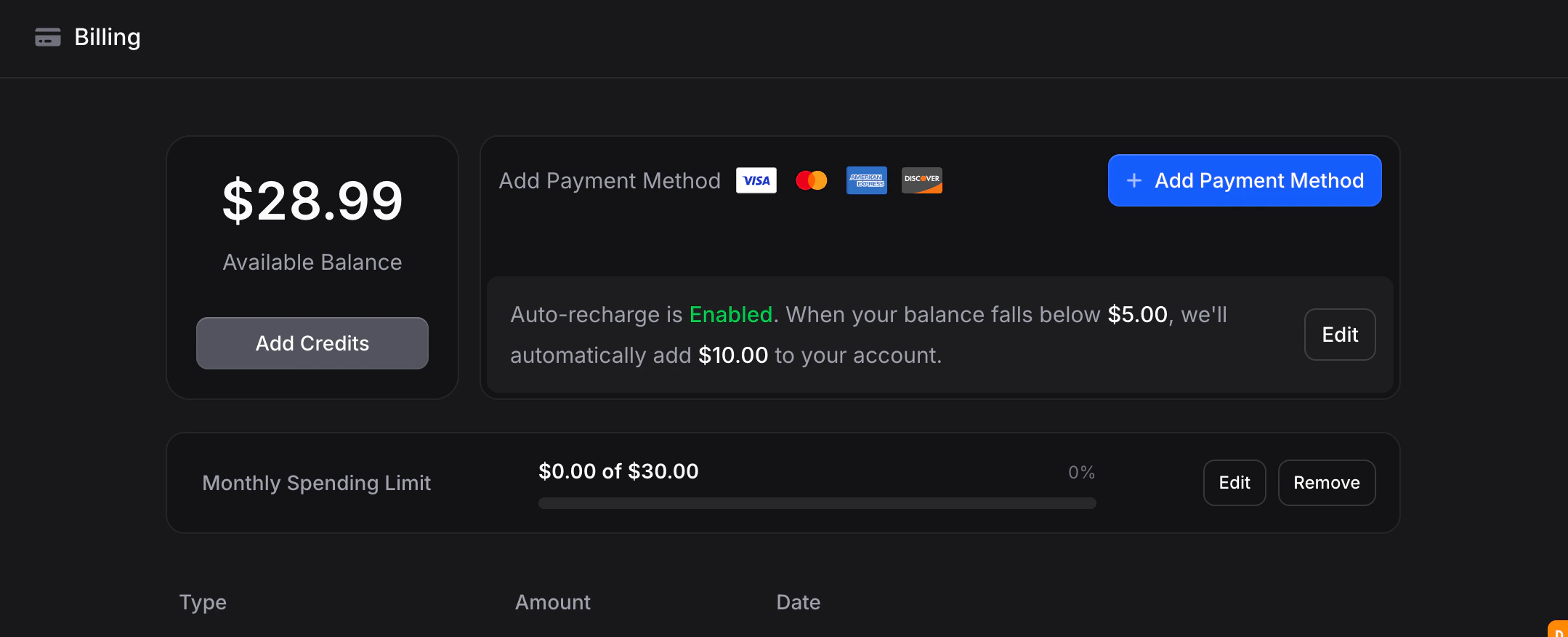 Spending limits are especially useful for sub-organizations, so you can cap costs per team or per client independently.
### Auto-Recharge
Keep your assistant running by automatically topping up when your balance dips below a threshold.
1. Go to **Settings** → **Billing**
2. Click **Edit** next to auto-recharge
3. Set your minimum balance threshold (default: \$10) and recharge amount (default: \$10)
4. Save
### Usage Tracking
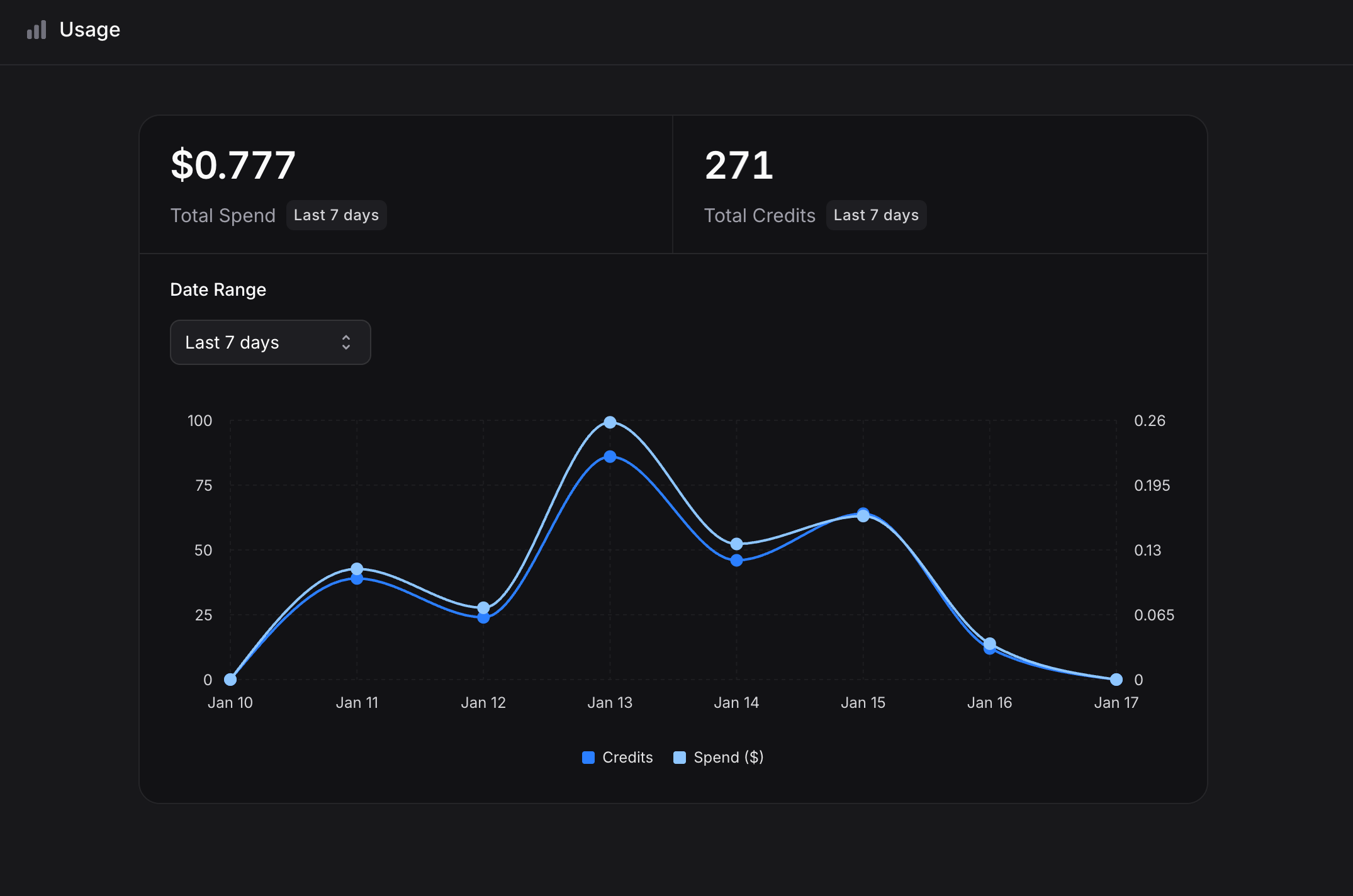
Watch your spend in real time at [**Settings → Usage**](https://useinvent.com/o/settings/usage):
* **Total Spend** in the selected period
* **Total Credits** consumed
* **Daily usage graph**
* **Date range filter**: 7 days, 30 days, 60 days, 90 days, year to date, custom
Spending limits are especially useful for sub-organizations, so you can cap costs per team or per client independently.
### Auto-Recharge
Keep your assistant running by automatically topping up when your balance dips below a threshold.
1. Go to **Settings** → **Billing**
2. Click **Edit** next to auto-recharge
3. Set your minimum balance threshold (default: \$10) and recharge amount (default: \$10)
4. Save
### Usage Tracking
Watch your spend in real time at [**Settings → Usage**](https://useinvent.com/o/settings/usage):
* **Total Spend** in the selected period
* **Total Credits** consumed
* **Daily usage graph**
* **Date range filter**: 7 days, 30 days, 60 days, 90 days, year to date, custom
 ### Billing History & Payment Methods
View past invoices, download receipts, and update your card under [**Settings → Billing**](https://useinvent.com/o/settings/billing). Payments are processed via Stripe and all major credit cards are accepted.
## Upgrading and Downgrading
Both available at [**Settings → Plans**](https://useinvent.com/o/settings/plans):
* **Upgrade to Business**: click **Manage Plan** under Business and confirm
* **Downgrade to Pay As You Go**: click **Downgrade** under Pay As You Go and confirm
Changes take effect immediately. When downgrading you lose access to Business-only features but keep all your data.
## FAQ
On the Auto model, around **\$30–35 a month** for \~3,000 messages. If your customers send a lot of voice notes, images, or PDFs, expect the upper end. The [cost calculator](https://useinvent.com/pricing#calculator) gives a live number for your exact setup.
No. \$29/month includes **\$29 of usage** and unlocks premium features (custom domain, whitelabel, audit logs, sub-organizations, Slack support, larger knowledge storage). Usage above \$29 is billed at the same per-message rates as Pay As You Go. You are never charged a premium for going over.
Start with **Auto**. It picks the best model per message automatically, balancing quality and cost. If you later need to tune costs down or quality up, the assistant settings show every available model with its per-message cost next to it, so you can compare at a glance.
The per-message figure assumes prompt caching is active. Your first message has no cache to read from, so it processes the full context at standard input rates. After that, consecutive messages benefit from caching and typically cost less than the figure.
Monthly, based on your organization's creation date. If your org was created on March 10, your free messages reset on the 10th of each month. Unused free messages do not roll over.
No. Free messages are granted to **one organization per account**. If you manage multiple organizations, only one receives the free monthly allocation.
Very little. About **\$0.0005 to index each chunk** (\~350–400 words) once at upload, and about **\$0.0005 per search** at query time. Repeated identical searches are cached free for 2 hours across your organization. For most businesses, knowledge costs are a few cents to a few dollars a month.
Each chunk (\~350–400 words) costs about **\$0.0005** to index, charged once at upload. A short FAQ page runs about **\$0.001**, a 10-page document around **\$0.007**, a full 100-page help center around **\$0.07**. The exact chunk count shows on your Knowledge page under **Total Chunks**.
Invent charges a small per-message fee per channel (about **\$0.001** for email and SMS, **\$0.004** for WhatsApp). Your own provider (Twilio, Meta, SendGrid) bills their delivery cost separately.
Yes. Set a **Monthly Spending Limit** at [Settings → Billing](https://useinvent.com/o/settings/billing) between \$0 and \$100,000. When the limit is reached, billable operations pause until you raise the limit or the next billing cycle begins.
Yes, via the HTTP Request action. Your assistant can call any external API or database to fetch real-time data during a conversation.
Yes, with a simple JavaScript snippet. See the [Web Widget](/assistants/widget) docs for the embed code and platform-specific install guides.
## Fair Usage
Invent reserves the right to limit accounts showing abusive patterns or excessive usage that impacts service quality for everyone else.
### Billing History & Payment Methods
View past invoices, download receipts, and update your card under [**Settings → Billing**](https://useinvent.com/o/settings/billing). Payments are processed via Stripe and all major credit cards are accepted.
## Upgrading and Downgrading
Both available at [**Settings → Plans**](https://useinvent.com/o/settings/plans):
* **Upgrade to Business**: click **Manage Plan** under Business and confirm
* **Downgrade to Pay As You Go**: click **Downgrade** under Pay As You Go and confirm
Changes take effect immediately. When downgrading you lose access to Business-only features but keep all your data.
## FAQ
On the Auto model, around **\$30–35 a month** for \~3,000 messages. If your customers send a lot of voice notes, images, or PDFs, expect the upper end. The [cost calculator](https://useinvent.com/pricing#calculator) gives a live number for your exact setup.
No. \$29/month includes **\$29 of usage** and unlocks premium features (custom domain, whitelabel, audit logs, sub-organizations, Slack support, larger knowledge storage). Usage above \$29 is billed at the same per-message rates as Pay As You Go. You are never charged a premium for going over.
Start with **Auto**. It picks the best model per message automatically, balancing quality and cost. If you later need to tune costs down or quality up, the assistant settings show every available model with its per-message cost next to it, so you can compare at a glance.
The per-message figure assumes prompt caching is active. Your first message has no cache to read from, so it processes the full context at standard input rates. After that, consecutive messages benefit from caching and typically cost less than the figure.
Monthly, based on your organization's creation date. If your org was created on March 10, your free messages reset on the 10th of each month. Unused free messages do not roll over.
No. Free messages are granted to **one organization per account**. If you manage multiple organizations, only one receives the free monthly allocation.
Very little. About **\$0.0005 to index each chunk** (\~350–400 words) once at upload, and about **\$0.0005 per search** at query time. Repeated identical searches are cached free for 2 hours across your organization. For most businesses, knowledge costs are a few cents to a few dollars a month.
Each chunk (\~350–400 words) costs about **\$0.0005** to index, charged once at upload. A short FAQ page runs about **\$0.001**, a 10-page document around **\$0.007**, a full 100-page help center around **\$0.07**. The exact chunk count shows on your Knowledge page under **Total Chunks**.
Invent charges a small per-message fee per channel (about **\$0.001** for email and SMS, **\$0.004** for WhatsApp). Your own provider (Twilio, Meta, SendGrid) bills their delivery cost separately.
Yes. Set a **Monthly Spending Limit** at [Settings → Billing](https://useinvent.com/o/settings/billing) between \$0 and \$100,000. When the limit is reached, billable operations pause until you raise the limit or the next billing cycle begins.
Yes, via the HTTP Request action. Your assistant can call any external API or database to fetch real-time data during a conversation.
Yes, with a simple JavaScript snippet. See the [Web Widget](/assistants/widget) docs for the embed code and platform-specific install guides.
## Fair Usage
Invent reserves the right to limit accounts showing abusive patterns or excessive usage that impacts service quality for everyone else.