

This page covers the transactional-specific flow. For the building blocks every broadcast shares (channels, templates, and variables), start with the Broadcasts overview. To send one message to a whole segment at once, see Marketing broadcasts.
No audience, no schedule. A transactional broadcast sends one message each time you trigger it, so there is no list to send to and no moment to schedule. Each recipient is messaged on every channel they are reachable on: someone with both an email and a WhatsApp number gets both. It is not a fallback chain.
How it works
1
Create a transactional broadcast
Click + Create Broadcast, name it, and choose Transactional as the type. The type cannot be changed after creation.
2
Add channels and content
Add one or more channels and complete a template for each. This is the same editor that marketing broadcasts use.
3
Check the variables
Each template slot is a variable already, prefilled with the template’s sample. The Variables section lists every name a trigger can pass with the default that goes out when it does not. Add your own with + Add variable for values that only arrive with the trigger.
4
Activate
Click Activate Broadcast to open the endpoint. The broadcast moves to Active and starts sending immediately when called.
5
Trigger from your backend
Call the send endpoint whenever the event happens. Each call delivers to one recipient.
Setting up the send
The Send section has two tabs: API and Manual.API
The API tab shows the exact endpoint for this broadcast, a ready-to-copy cURL example, and a link to manage your API keys.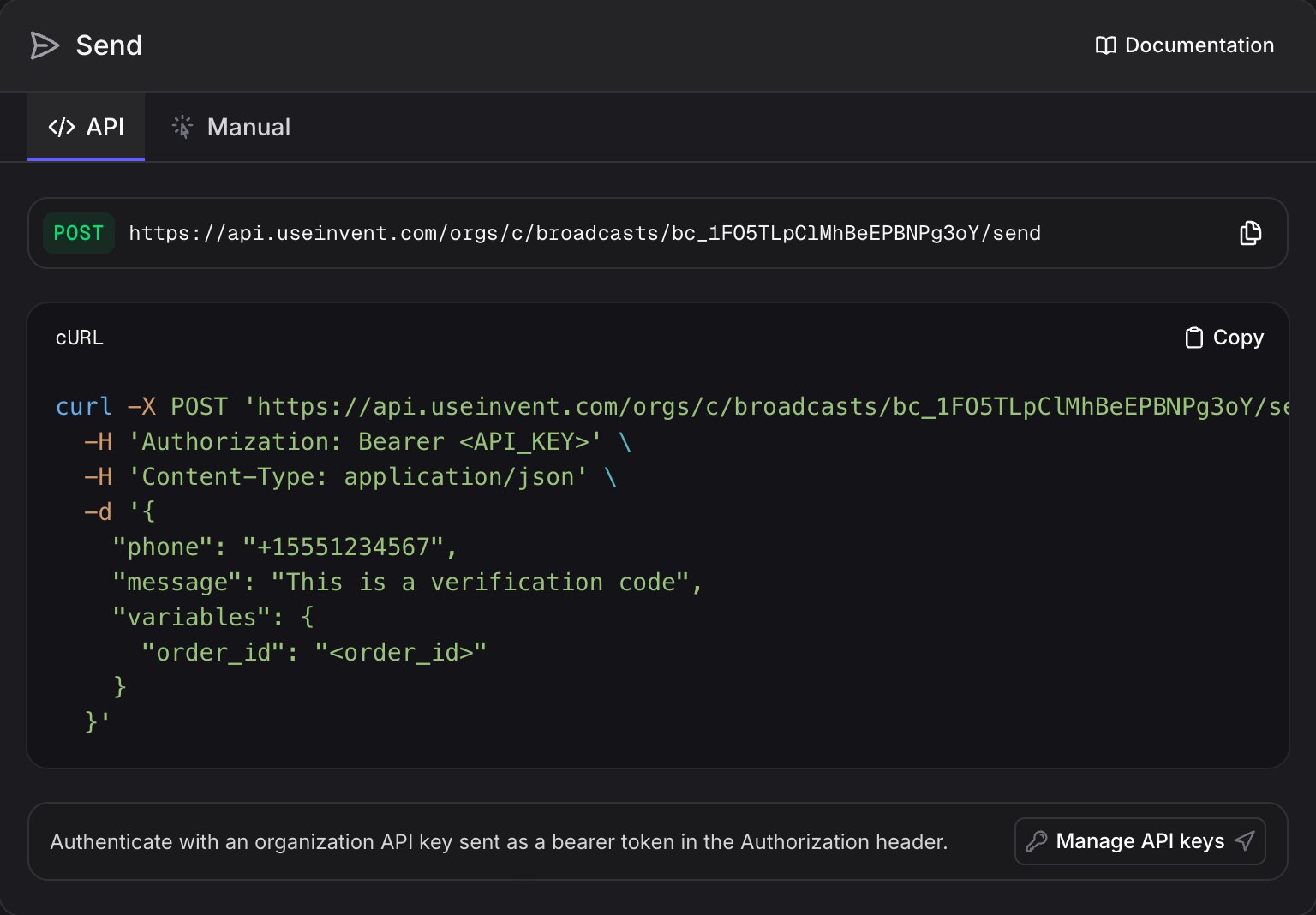
The path omits your org ID: the API key already names the organization.
Authenticate with an organization API key, sent as a bearer token in the
Authorization header. Create and manage keys in Settings, API keys.Identifying the recipient
Every trigger names exactly one recipient. Provide at least one identifier, in order of precedence:Overriding the recipient details
phone, email, and name double as per-send overrides. When you also pass a contact_id or contact_channel_id, any of these you include replaces the resolved channel and contact value for that send only. The contact and its stored channels are never modified.
name is an override, not an identifier. It cannot resolve a recipient on its own, so a trigger still needs one of contact_channel_id, contact_id, phone, or email.Overriding the content
subject, body, reply_to, and message are slots like any other: pass them in variables to replace the configured content for a single send. Each key applies to every template whose channel exposes it: subject, body, and reply_to to email templates, message to SMS templates. Overrides support the same {{variable}} placeholders as template content, and the templates themselves are never modified.
WhatsApp is currently the only generally available broadcast channel. The email (
subject, body, reply_to) and SMS (message) overrides are documented for when those channels ship; on a WhatsApp-only broadcast they are ignored.Request body
The response returns one recipient record per template fired, so you can confirm exactly what was sent.
Manual
The Manual tab fires the same endpoint from the dashboard: enter a recipient, override any slot you want, and click Send message. Handy for one-off sends and spot checks without leaving the UI. Only the identifiers your channels can deliver to are asked for, so a WhatsApp or SMS broadcast asks for a phone and an email-only broadcast asks for an email. Under Content, the tab lists every slot your channels expose, with the configured value as the placeholder. Filling one replaces it for that send only; leave a field blank to keep the template’s. Your saved template is never modified. After sending, the tab switches to a delivery timeline for that message and updates live as the channel reports back, so you can watch it go from sent to delivered without reloading.Variables
Transactional templates use the same variables as marketing broadcasts, with one difference in where the values come from:- The channel editor holds what goes out when a trigger omits a name.
- Per-trigger values are passed in the
variablesobject and replace those slots for that send.
order_confirmation broadcast can carry a different body_1 and body_2 on every call. The Variables section and the Send section show the exact names for your templates.
Activating, pausing, and resuming
1
Activate
With at least one complete template, click Activate Broadcast. Activating opens the endpoint, and the broadcast starts sending immediately when called. Status: Active.
2
Pause
Click Pause to close the endpoint. New sends are rejected while paused, and your configuration is preserved. Status: Paused.
3
Resume
Click Resume to reopen the endpoint. The broadcast returns to Active with the same setup.
You can pause and resume as often as you need without losing templates, variables, or settings. A transactional broadcast stays live until you pause it.
Monitoring
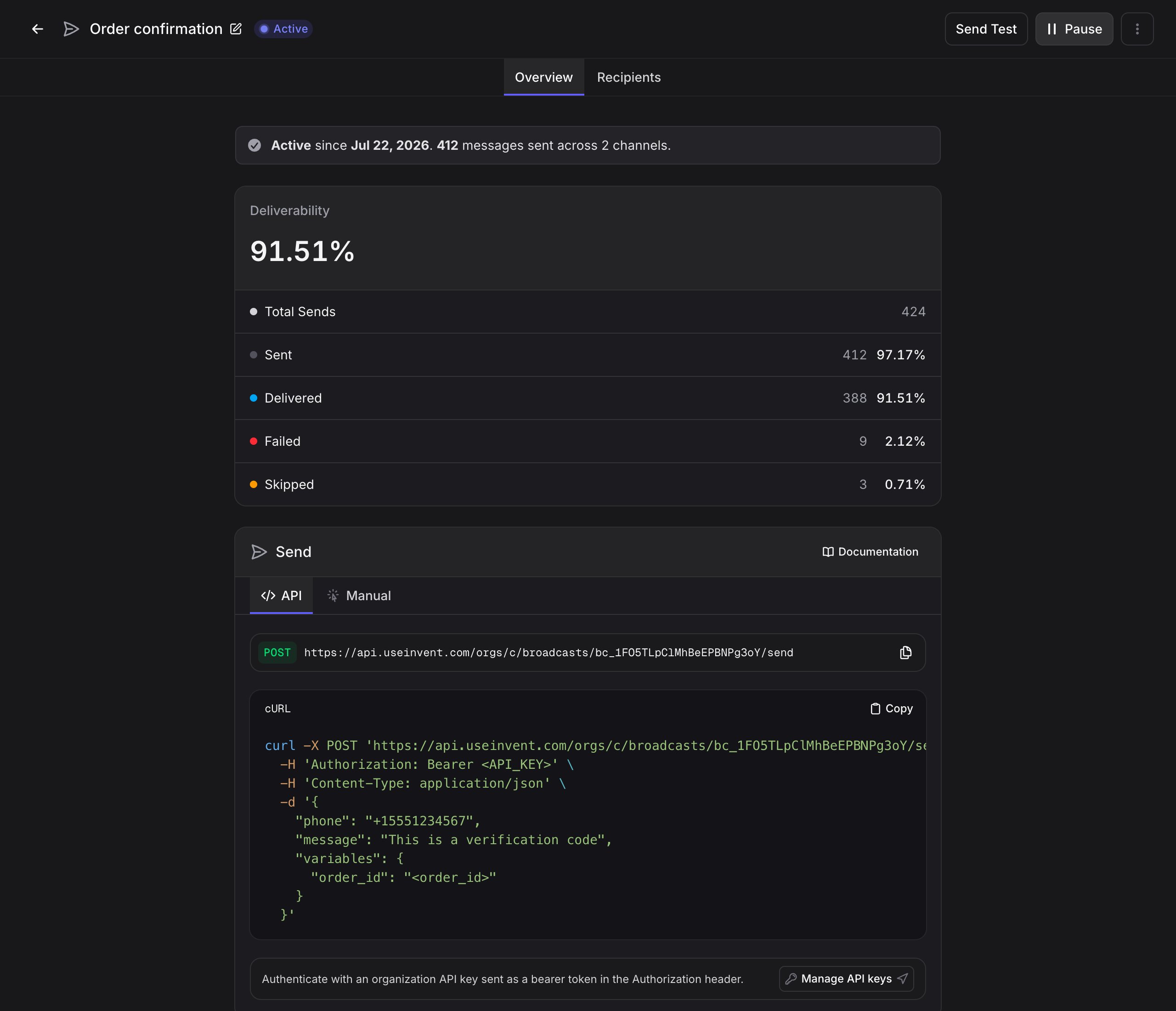
An active broadcast shows a live status banner with the date it was activated and how many messages have been sent across how many channels. A paused broadcast shows the paused state and the same totals. Above it, Deliverability and Engagement report the rates for this endpoint. Because a transactional broadcast sends repeatedly to the same people, these are measured against total sends rather than distinct recipients, so the figure shown is Total Sends. The Recipients table lists every triggered message with its channel, delivery status, and a Source column showing whether the trigger came from the API or a manual send. Because each trigger fans out across templates, one call can produce several rows, one per template.Consent and compliance
Unsubscribing is a marketing preference, so an unsubscribed contact still receives transactional sends: a receipt or a one-time code is not a newsletter. A trigger is rejected (the API returns a 422 error and nothing is sent) when the recipient is blocked, when any contact in your organization sharing the same email or phone is blocked, or when the address or number is on the suppression list as Bounced, Marked as spam, Legal request, or Added manually. An Unsubscribed suppression entry does not stop a transactional send. You do not need to filter these recipients yourself.
Next steps
Marketing Broadcasts
Send one message to a whole segment at once
API keys
Create and manage the keys that authenticate your triggers
Configure WhatsApp Templates for transactional sends
Broadcasts Overview
Channels, variables, and statuses shared by every broadcast