

How Memory Works
Every time your assistant has a conversation, it automatically identifies and stores important information about the customer:- Names and preferences
- Past purchases or inquiries
- Specific requests or issues
- Personal details they’ve shared
- Conversation context and history
Why Memory Matters
Personalized Experiences
When a customer messages your WhatsApp number for the first time in weeks, your assistant already knows:- Their name
- What they bought last time
- Any issues they had
- Their preferences
Consistent Across Channels
A customer chats on your website, then messages on Instagram a week later. Your assistant remembers everything from both conversations. The customer does not need to repeat themselves.Building Relationships
Memory transforms routine interactions into relationship-building moments:- “Welcome back, Sarah! How did the yoga class go last Tuesday?”
- “I remember you mentioned you prefer morning appointments.”
- “Last time you asked about our premium plan, still interested?”
What Gets Remembered
Your assistant automatically identifies and stores:- Contact information: Names, emails, phone numbers
- Preferences: Favorite products, preferred times, communication style
- History: Past purchases, previous issues, conversation summaries
- Context: Ongoing projects, pending requests, follow-up items
Memory is controlled by the Memories capability toggle in assistant Settings → Capabilities. It is on by default, so you can leave it as is, but you can turn it off for an assistant that shouldn’t retain customer details.
Viewing Customer Memory
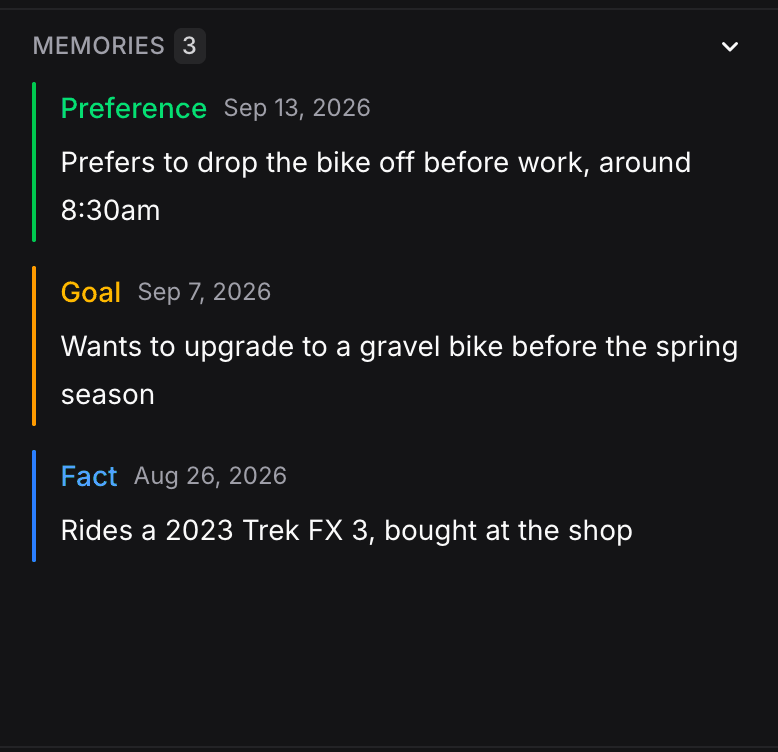
In the Inbox, select any conversation and open the Contact Panel on the right. The Memories section lists everything your assistant remembers about this customer, organized by type (Facts, Preferences, Goals, Experiences). You can view and delete individual memories from here.Privacy and Control
Memory respects customer privacy:- Customers can request their data be deleted
- You can clear memory for any contact
- Sensitive information (like payment details) is handled securely
- Memory only stores what’s relevant to customer service
Memory in Action
Here’s a real example of memory working: First conversation (Monday):Customer: “Hi, I’m looking for a yoga class for beginners”
Assistant: “Great! We have beginner classes Tuesday and Thursday at 6 PM. Would you like to book one?”
Customer: “Tuesday works. My name is Maria.”
Assistant: “Perfect, Maria! You’re booked for Tuesday at 6 PM.”Second conversation (Following week):
Customer: “Hey”
Assistant: “Hi Maria! How was your first yoga class last Tuesday? Ready to book another session?”The assistant remembered Maria’s name, that she’s a beginner, and when her class was, all without being asked.
Three kinds of memory
Contact memories belong to the contact, not the chat. If you test in the playground with the same contact, a new test chat still remembers your earlier tests. To start fresh, click the Test contact icon in the assistant’s playground, open the contact’s options and delete it.
Best Practices
- Let it work automatically: Memory handles itself, no configuration needed
- Review occasionally: Check what your assistant remembers about key customers in the Inbox
- Trust the process: The more conversations, the smarter your assistant becomes
- Respect privacy: Delete memory when customers request it
- Combine with Instructions: Add a “What to Remember” section in your Instructions to guide what your assistant prioritizes (e.g., names, preferences, past purchases)
Next Steps
Inbox
View customer memories alongside conversations in the contact panel
Writing Effective Instructions
Add memory-related rules to your instructions for better personalization