

SSO requires a Business or Enterprise plan. View plans
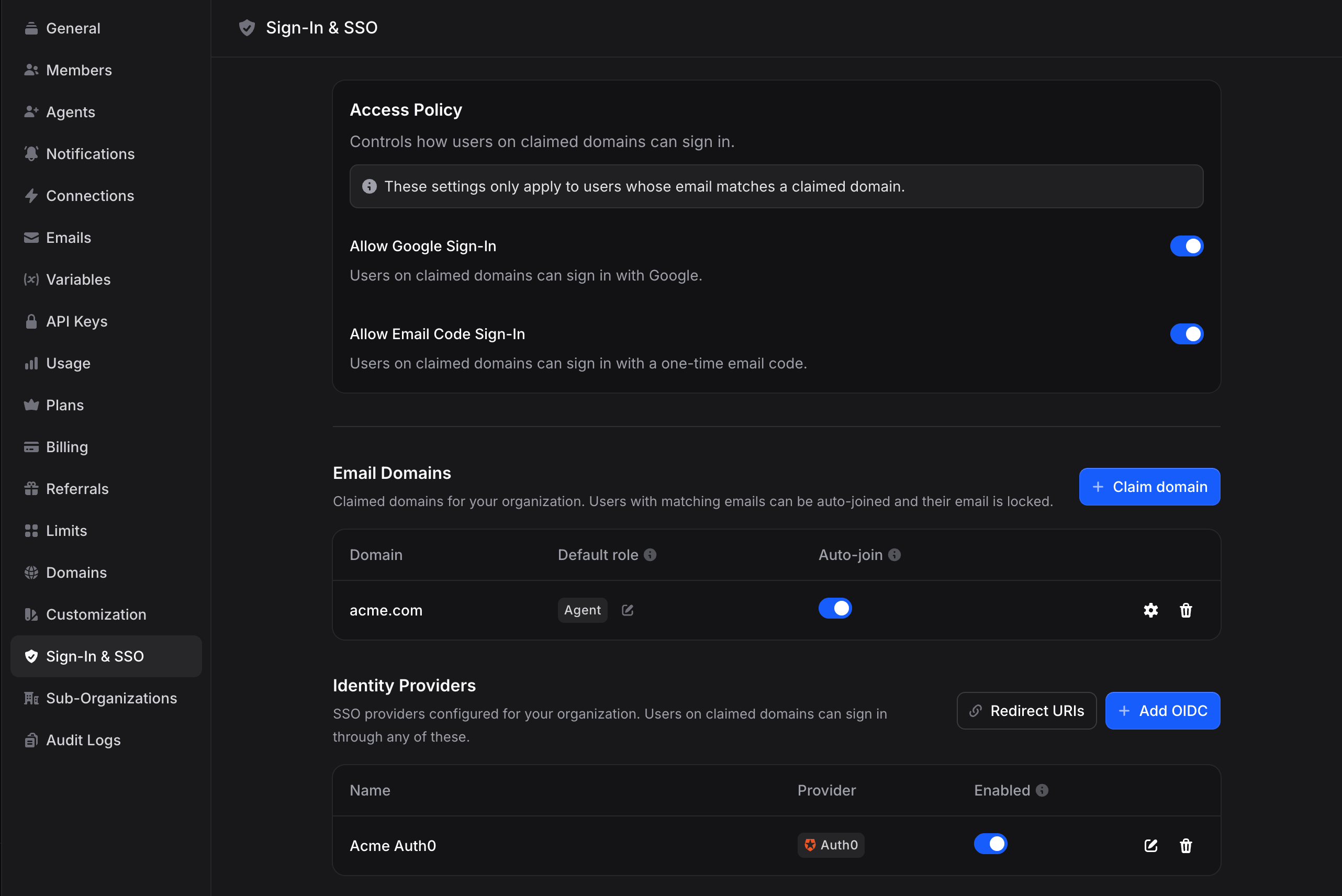
How SSO Works in Invent
SSO in Invent is built on three concepts that work together:Access Policy
Organization-wide rules that determine which login methods (SSO, Google, Microsoft, Apple, or email code) are permitted for users on your verified domains.
Domains
Email domains that your organization has claimed and verified. Domains govern auto-join, default roles, and profile sync for users whose email matches.
Profiles
Individual identity-provider configurations (Okta, Entra ID, Google, and others). Each profile is an OIDC connection that users can sign in through.
Key Concepts
Verified Domains
A domain is an email domain that your organization has proven it owns (for example,acme.com). Verification is completed by entering a one-time 6-digit code sent to an address on that domain. A given domain can only be claimed by one Invent organization; the first organization to complete verification becomes its sole owner.
SSO Profiles
A profile is the OIDC configuration for a single identity provider. A single organization may have multiple profiles. For example, one profile can be used for the primary workforce identity provider and a separate profile for contractors on a different identity provider. Invent recognizes popular vendors automatically from the Issuer URI and displays their logo and canonical name in the provider picker.Just-in-Time (JIT) Provisioning
When a user signs in through SSO for the first time and no matching Invent account exists, Invent creates one automatically from the identity-provider claims. JIT can be disabled on a per-profile basis if your organization requires that users be invited explicitly before they can sign in.Auto-Join
When a new user signs up with an email matching a verified domain, Invent can automatically add them to your organization as a member with a configurable default role. Auto-join applies to all sign-in methods, not only SSO. A user who signs up with Google using their@acme.com email is auto-joined in exactly the same way as a user who signs up through SSO.
Profile Sync
On every SSO sign-in, Invent can refresh the user’s name, avatar, and email from the claims returned by the identity provider. This keeps Invent’s view of each user consistent with your directory of record and, depending on your domain configuration, prevents users from manually editing identity fields that are owned by the identity provider.Who Can Manage SSO
Managing SSO requires both of the following:- The Admin role in the organization.
- A Business or Enterprise subscription.
What End Users See
Users on your verified domains get a streamlined, branded sign-in experience:- They visit the Invent sign-in page and click Use SSO instead.
- They enter their company email and click Sign in with SSO.
- Invent resolves your SSO configuration from the email domain and redirects them to your identity provider.
- After successful authentication at your identity provider, they are signed in to Invent and redirected to the dashboard.
Plan Limits
Setup Checklist
The setup path depends on whether you want to connect an external identity provider. The first step is required either way.1
Verify your domain
Claim and verify the email domain your team uses (for example,
acme.com). Invent emails a 6-digit verification code to an address on that domain. As soon as verification completes, auto-join, default roles, profile sync, and email and profile change locks begin applying to every user on that domain, regardless of which sign-in method they use.2
Configure your identity provider (optional)
Skip this step if your team signs in with Google Workspace or one-time email codes. Otherwise, create an OIDC application inside your identity provider and copy the relevant redirect URIs from Invent’s Redirect URIs dialog into your identity provider’s list of allowed redirect URIs.
3
Create an SSO profile (optional)
Skip this step unless you completed step 2. Add a profile in Invent using your identity provider’s Issuer URI, Client ID, and Client Secret. Invent automatically discovers the remaining endpoints from your identity provider’s
.well-known/openid-configuration document.4
Test the sign-in flow
Sign out of Invent and sign in again using your company email. If you configured an SSO profile, the identity provider should appear in the SSO provider picker. Otherwise, confirm that Google, Microsoft, Apple, and email-code sign-in continue to work as expected for your verified domain.
5
Tune your Access Policy
Review the Access Policy. If no SSO profile is configured, the policy toggles are informational only and all sign-in methods remain available. If an SSO profile is enabled, decide whether to keep Google, Microsoft, and email-code sign-in available or require SSO exclusively for users on your verified domains.
Supported Identity Providers
Invent implements standards-compliant OpenID Connect (OIDC), which means any OIDC-capable identity provider can be used for sign-in. Invent has first-class display recognition (correct vendor name and logo in the provider picker) for the following vendors:- Microsoft Entra ID (formerly Azure AD)
- Google Workspace
- Okta
- Auth0
- PingOne and Ping Identity
- OneLogin
- JumpCloud
- Amazon Cognito
- IBM Security Verify
- Oracle Identity Cloud Service
- Cisco Duo
SAML 2.0 is on the roadmap but is not yet supported for sign-in. If your identity provider only supports SAML, please contact Invent support. Most commercial identity providers can also expose an OIDC endpoint, and we can usually help you enable it.